
TV Wall Mounting in Santa Clarita
Santa Clarita TV Mounting covers flat-screen TV wall mounting across the Santa Clarita Valley — drywall, plaster, brick and stucco — where a professional installer anchors a fixed or tilting bracket into framing or rated masonry anchors, levels it with a laser and load-tests it before leaving.
Bookings aren't open yet. Leave your name and number; your message is recorded, and you'll get one message when a local installer is available.
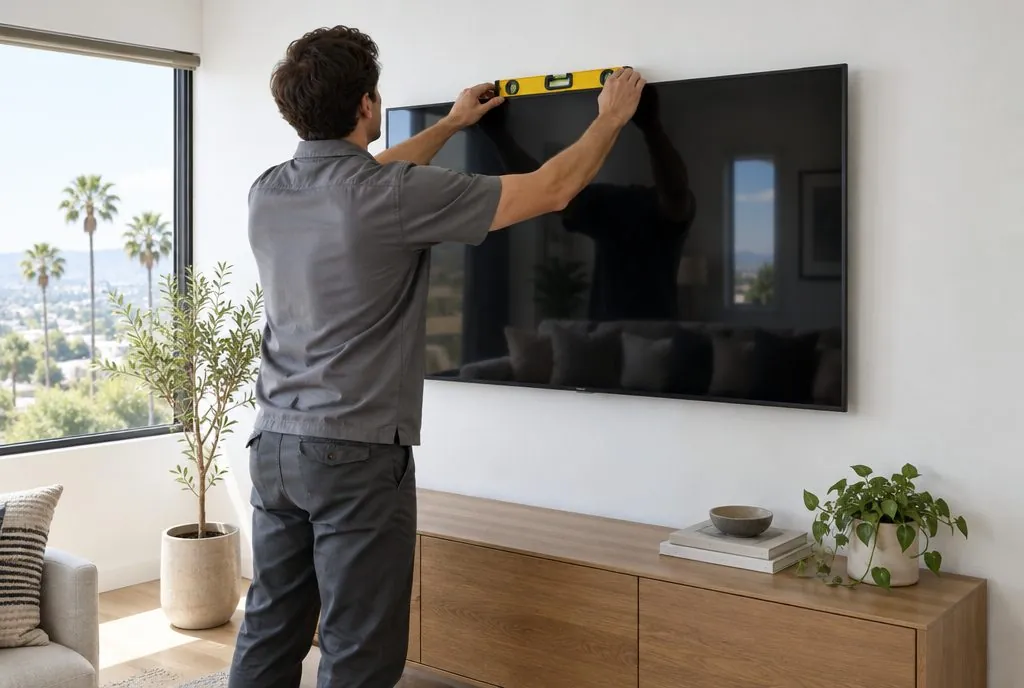 Illustration
TV Wall Mounting in Santa Clarita, CA typically runs $99–$389 per TV in our 2027 estimator, depending on the TV size and the wall type. Use the estimator below for your own numbers.
What a standard TV wall mount includes
A standard wall mount is the right call when the TV faces the seating straight on and sits at eye level: a living-room media wall, a bedroom wall opposite the bed, a den or home office. The bracket holds the screen 1–2 inches off the wall, so there is nothing to adjust later and nothing to knock out of alignment.
Stud location and anchoring
A good installer finds studs with an AC-sensing finder and confirms with a probe before drilling. Most Santa Clarita homes built after 1980 have 16-inch wood stud spacing; some condos in Newhall and Valencia use steel studs, which need toggle anchors instead of lag bolts. Where the bracket spans only one stud, Snaptoggle-type anchors rated for the load go in rather than plastic sleeves.
Viewing height and leveling
The screen center is marked from the actual seat height — usually 42–48 inches from the floor for a sofa — then the bracket is leveled with a laser and re-checked after the TV is on. Tilting brackets get set at the angle that kills glare from the windows in the room.
Cable tidy-up
Power and HDMI get bundled and routed behind the TV to the nearest outlet. For cables out of sight entirely, add in-wall concealment or a paintable raceway — installers price it as a line item so the homeowner can decide.
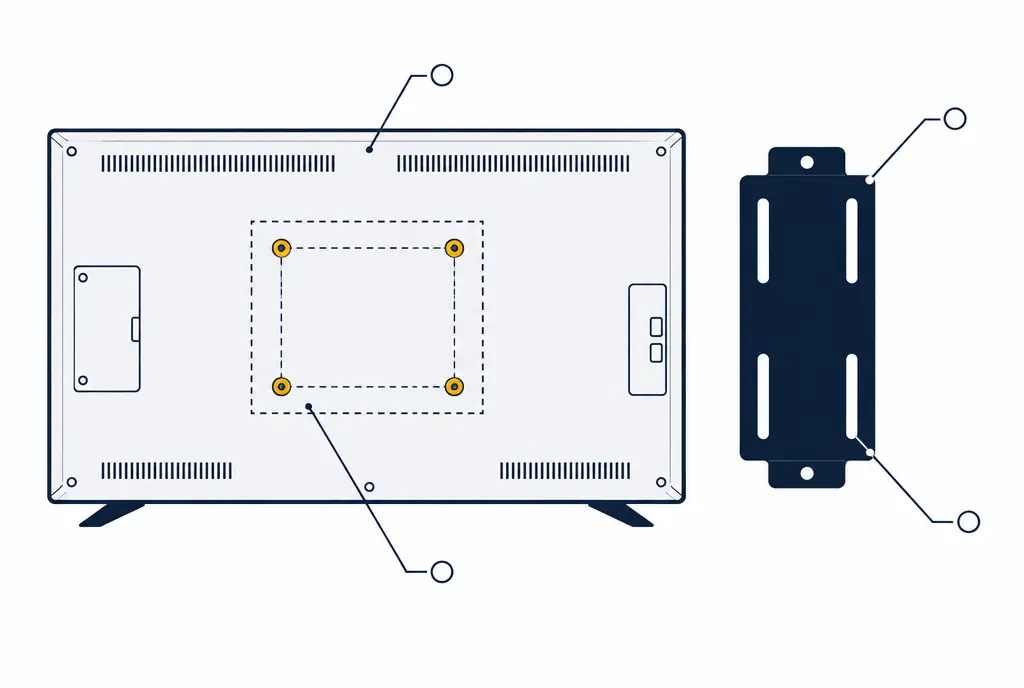
What the callout markers point to
- Common patterns run from 200×200 mm on small TVs to 600×400 mm and larger on 75–85 inch sets.
- The dashed rectangles show how patterns nest: a universal bracket covers several sizes with slotted holes.
- Bolt length matters as much as the pattern: too long and it bottoms out inside the panel.
Fixed vs. tilting: which mount should you choose?
Fixed (low-profile) brackets sit flattest — ideal when the TV is at eye level and you want it to look built-in. Tilting brackets add 5–15° of downward angle, which matters when the TV is above eye level (a dresser-height bedroom mount, a bonus-room wall) or when afternoon sun hits the screen. Both carry UL weight ratings; the bracket is matched to the TV's weight and VESA hole pattern (200×200 up to 600×400 on most 55–85 inch sets).
| TV size | Common VESA pattern | Typical TV weight | Bracket rated for at least |
|---|---|---|---|
| 32–43 in | 100×100 to 200×200 | 10–25 lbs | 40 lbs |
| 50–55 in | 200×200 to 400×400 | 25–45 lbs | 70 lbs |
| 65 in | 300×300 to 400×400 | 45–65 lbs | 100 lbs |
| 75 in | 400×300 to 600×400 | 60–90 lbs | 135 lbs |
| 85 in | 400×400 to 600×400 | 75–110 lbs | 165 lbs |
The figures are typical ranges; the exact weight and hole pattern are printed on the label on the back of each set and in its manual.
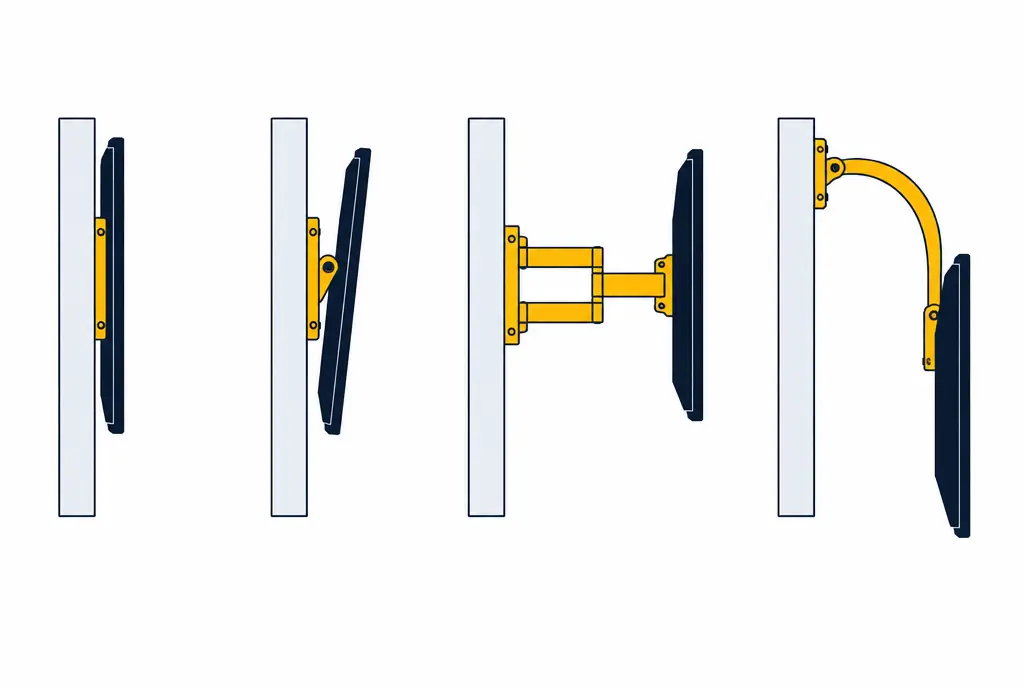
What the callout markers point to
- Fixed: the thinnest profile, no adjustment after the install.
- Tilting: angles the screen down for high placements and glare.
- Full-motion extends and swivels; pull-down lowers a fireplace TV to eye level.
Wall types a Santa Clarita TV mount has to handle
- Drywall over wood studs — the majority of Valencia, Saugus and Canyon Country homes. Lag bolts into studs.
- Steel-stud drywall — many Newhall and Valencia condos and townhomes. Toggle anchors sized to the stud gauge.
- Plaster and lath — Old Town Newhall and older Saugus houses. Pilot holes and longer fasteners into the lath and studs behind.
- Brick, block and stone — fireplace surrounds and exterior-style feature walls. Sleeve anchors or wedge anchors, never masonry screws alone.
- Stucco over sheathing — covered patios in Castaic and Stevenson Ranch. Fasteners through the stucco into framing, sealed against moisture.
A TV mount is only as strong as the material its bolts bite into.
Hardware and specs a proper install follows
Brackets are rated to at least 1.5× the TV's weight. Lag bolts are 5/16" × 2.5–3" into wood framing; toggles are rated 100+ lbs each in 1/2" drywall. HDMI runs are 18 Gbps or 48 Gbps certified depending on the source (Apple TV, PS5, cable box). Mounting height follows the 42–48 inch center rule for seated viewing, adjusted for the furniture.
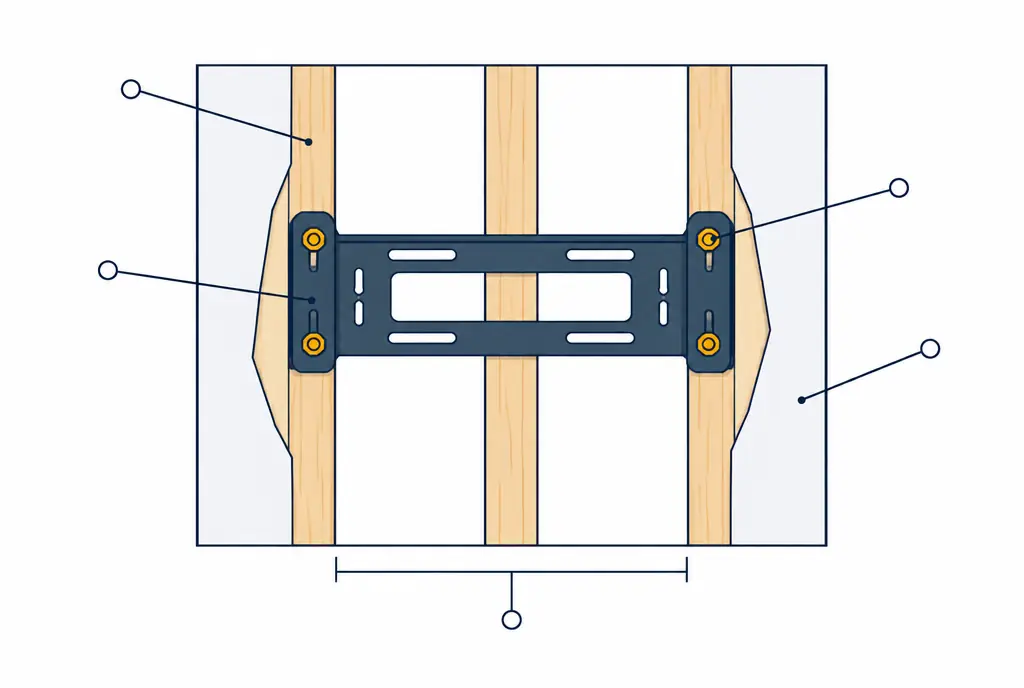
What the callout markers point to
- Studs sit 16 or 24 inches apart in most Santa Clarita homes; the plate is sized to catch two of them.
- Each lag bolt passes through the plate into the center of a stud and is torqued until the plate cannot shift.
- The drywall between the studs carries no load; it only hides the framing.
TV Wall Mounting — common questions
Can a TV be mounted on a wall with no studs where I want it?
Yes, on 1/2-inch or 5/8-inch drywall the installer uses rated toggle anchors (100–240 lbs each). For very large TVs (77 inch and up) a plywood backer painted to match may be added so the load spreads across framing.
Does the installer take the old TV down or move an existing mount?
Yes — dismount and re-mount is a separate service, and the old holes can be patched and painted.
How long does a wall mount take?
45–75 minutes for a single TV on drywall with the cables tidied; longer with in-wall concealment.
TV Wall Mounting: check availability and price range
Bookings aren't open yet — tell us about the TV and the wall. You get a Santa Clarita price range on the next screen. Typical Santa Clarita Valley prices for one TV, labor only unless an option says otherwise. This is a market estimate, not a quote.